Benchmarks
Benchmark scenarios for evaluating different control approaches.
Reach-Avoid
A robot (blue dots) must avoid an obstacle (grey) and reach a goal (green).
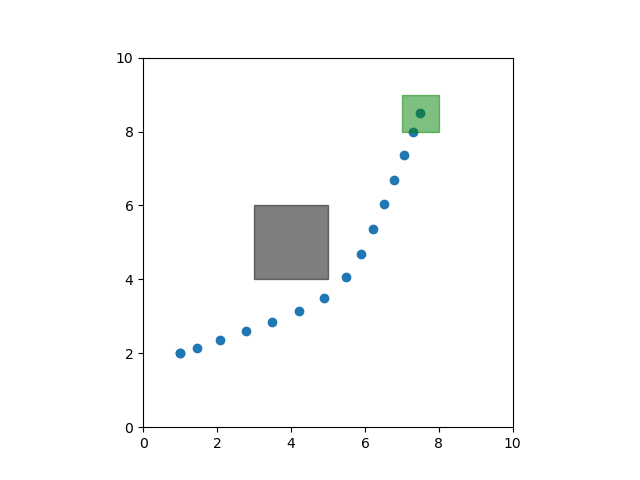
- class stlpy.benchmarks.ReachAvoid(goal_bounds, obstacle_bounds, T)
Bases:
BenchmarkScenarioA 2D mobile robot with double integrator dynamics must avoid an obstacle (\(\mathcal{O}\)) before reaching a goal (\(\mathcal{G}\)):
\[\varphi = G_{[0,T]} \lnot \mathcal{O} \land F_{[0,T]} \mathcal{G}\]- Parameters
goal_bounds – a tuple
(xmin, xmax, ymin, ymax)defining a rectangular goal region.obstacle_bounds – a tuple
(xmin, xmax, ymin, ymax)defining a rectangular obstacle.T – the time horizon for this scenario.
- GetSpecification()
Get the STL specification associated with this scenario.
- Return spec
an
STLFormuladescribing the specification.
- GetSystem()
Get the system dynamics model associated with this scenario.
- Return sys
a
LinearSystemorNonlinearSystemspecifying the system dynamics.
- add_to_plot(ax)
Add a visualization of this specification to the given
matplotlibaxis.- Parameters
ax – The
matplotlibaxis object to add the visualization to.
Nonlinear Reach-Avoid
A robot (blue dots) must avoid an obstacle (grey) and reach a goal (green). The goal and obstacle are both circles, requiring nonlinear predicates. The robot has (nonlinear) unicycle dynamics.
Due to the nonlinear dynamics and nonlinear predicates, this benchmark cannot be currently be solved with MICP-based methods. It can be solved using gradient-based optimization.
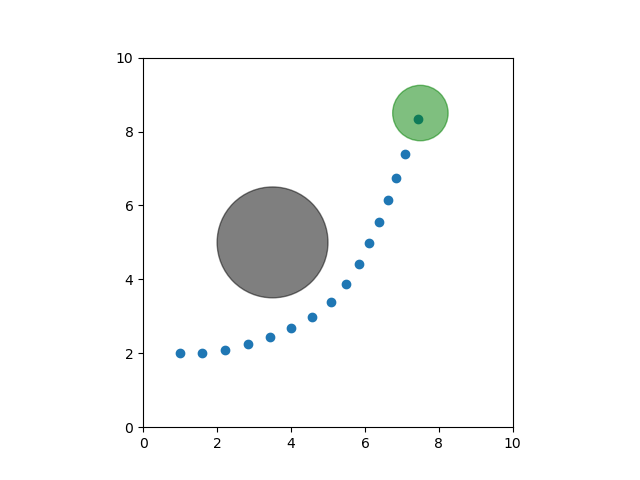
- class stlpy.benchmarks.NonlinearReachAvoid(goal_center, goal_radius, obstacle_center, obstacle_radius, T)
Bases:
BenchmarkScenarioA 2D mobile robot with unicycle dynamics must avoid a circular obstacle (\(\mathcal{O}\)) before reaching a circular goal (\(\mathcal{G}\)):
\[\varphi = G_{[0,T]} \lnot \mathcal{O} \land F_{[0,T]} \mathcal{G}\]- Parameters
goal_center – a tuple
(px, py)defining the center of the goal regiongoal_radius – a scalar defining the goal radius
obstacle_center – a tuple
(px, py)defining the center of the obstacle regionobstacle_radius – a scalar defining the obstacle radius
T – the time horizon for this scenario.
- GetSpecification()
Get the STL specification associated with this scenario.
- Return spec
an
STLFormuladescribing the specification.
- GetSystem()
Get the system dynamics model associated with this scenario.
- Return sys
a
LinearSystemorNonlinearSystemspecifying the system dynamics.
- add_to_plot(ax)
Add a visualization of this specification to the given
matplotlibaxis.- Parameters
ax – The
matplotlibaxis object to add the visualization to.
Either-Or
In addition to avoiding an obstacle (grey) and reaching a goal (green), the robot must visit one of two intermediate target regions (blue) and stay at the target for several timesteps.

- class stlpy.benchmarks.EitherOr(goal, target_one, target_two, obstacle, T, T_dwell)
Bases:
BenchmarkScenarioA 2D mobile robot with double integrator dynamics must avoid an obstacle (\(\mathcal{O}\)) before reaching a goal (\(\mathcal{G}\)). Along the way, the robot must reach one of two intermediate targets (\(\mathcal{T}_i\)) and stay there for several timesteps:
\[\varphi = F_{[0,T-\tau]} \left( G_{[0,\tau]} \mathcal{T}_1 \lor G_{[0,\tau]} \mathcal{T}_2 \right) \land F_{[0,T]} \mathcal{G} \land G_{[0,T]} \lnot \mathcal{O}\]- Parameters
goal – Tuple containing bounds of the rectangular goal region
target_one – Tuple containing bounds of the rectangular first target
target_two – Tuple containing bounds of the rectangular second target
obstacle – Tuple containing bounds of the rectangular obstacle
T – Total number of time steps
T_dwell – Dwell time \(\tau\) (integer number of timesteps)
- GetSpecification()
Get the STL specification associated with this scenario.
- Return spec
an
STLFormuladescribing the specification.
- GetSystem()
Get the system dynamics model associated with this scenario.
- Return sys
a
LinearSystemorNonlinearSystemspecifying the system dynamics.
- add_to_plot(ax)
Add a visualization of this specification to the given
matplotlibaxis.- Parameters
ax – The
matplotlibaxis object to add the visualization to.
Narrow Passage
A robot must avoid several obstacles (grey) and reach one of two goals (green), and the passageway between obstacles is narrow.

- class stlpy.benchmarks.NarrowPassage(T)
Bases:
BenchmarkScenarioA 2D mobile robot with double integrator dynamics must navigate around several obstacles (\(\mathcal{O}_i\)) before reaching one of two goals (\(\mathcal{G}_i\)).
\[\varphi = F_{[0,T]}(\mathcal{G}_1 \lor \mathcal{G}_2) \land G_{[0,T]} \left( \bigwedge_{i=1}^4 \lnot \mathcal{O}_i \right)\]- Parameters
T – The time horizon of the specification.
- GetSpecification()
Get the STL specification associated with this scenario.
- Return spec
an
STLFormuladescribing the specification.
- GetSystem()
Get the system dynamics model associated with this scenario.
- Return sys
a
LinearSystemorNonlinearSystemspecifying the system dynamics.
- add_to_plot(ax)
Add a visualization of this specification to the given
matplotlibaxis.- Parameters
ax – The
matplotlibaxis object to add the visualization to.
Multi-Target
A robot must avoid obstacles (grey) and visit at least one target of each type/color. Targets and obstacles are placed randomly.

- class stlpy.benchmarks.RandomMultitarget(num_obstacles, num_groups, targets_per_group, T, seed=None)
Bases:
BenchmarkScenarioA 2D mobile robot with double integrator dynamics must navigate through a field of obstacles (grey, \(\mathcal{O}_i\)) and reach at least one target of each color (\(\mathcal{T}_i^j\)):
\[\varphi = \bigwedge_{i=1}^{N_c} \left( \bigvee_{j=1}^{N_t} F_{[0,T]} T_{i}^{j} \right) \land G_{[0,T]} (\bigwedge_{k=1}^{N_o} \lnot O_k),\]- Parameters
num_obstacles – number of obstacles, \(N_o\)
num_groups – number of target groups/colors, \(N_c\)
targets_per_group – number of targets in each group, \(N_t\)
T – time horizon of the specification
seed – (optional) seed for random generation of obstacle and target locations. Default is
None.
- GetSpecification()
Get the STL specification associated with this scenario.
- Return spec
an
STLFormuladescribing the specification.
- GetSystem()
Get the system dynamics model associated with this scenario.
- Return sys
a
LinearSystemorNonlinearSystemspecifying the system dynamics.
- add_to_plot(ax)
Add a visualization of this specification to the given
matplotlibaxis.- Parameters
ax – The
matplotlibaxis object to add the visualization to.
Door Puzzle
A robot must avoid obstacles (grey) and reach a goal (green), but before reaching the goal it must pass through several doors (red). It can only pass through a door once the corresponding key has been picked up (e.g., visit the blue region).
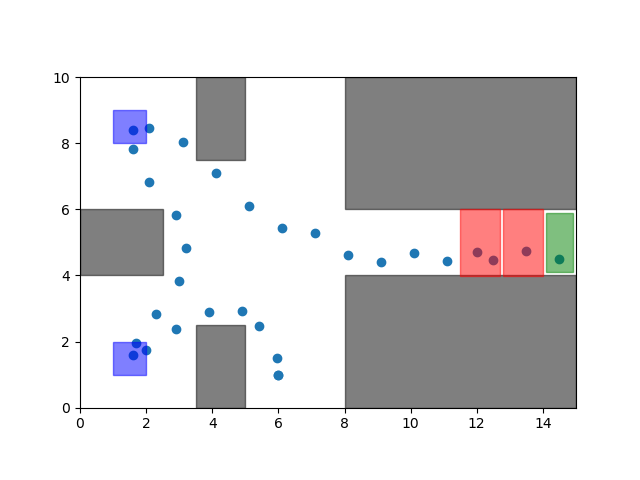
- class stlpy.benchmarks.DoorPuzzle(T, N)
Bases:
BenchmarkScenarioA mobile robot with double integrator dynamics must pick up several keys (by visiting certain regions \(\mathcal{K}_i\)) before it cat pass through associated doors (\(\mathcal{D}_i\)) and reach a goal (\(\mathcal{G}\)). Along the way, it must avoid obstacles (\(\mathcal{O}_j\)).
\[\varphi = \bigwedge_{i=1}^{N} \left( \lnot \mathcal{D}_i U_{[0,T]} \mathcal{K}_i \right) \land F_{[0,T]} \mathcal{G} \land G_{[0,T]} (\bigwedge_{j=1}^5 \lnot \mathcal{O}_i)\]- Parameters
T – The time horizon for this scenario
N – The number of key-door pairs. Must be between 1 and 4.
- GetSpecification()
Get the STL specification associated with this scenario.
- Return spec
an
STLFormuladescribing the specification.
- GetSystem()
Get the system dynamics model associated with this scenario.
- Return sys
a
LinearSystemorNonlinearSystemspecifying the system dynamics.
- add_to_plot(ax)
Add a visualization of this specification to the given
matplotlibaxis.- Parameters
ax – The
matplotlibaxis object to add the visualization to.
Stepping-Stones
The robot must reach a goal (green), but can only step in certain areas (yellow). The goal and stepping stone locations are randomly generated.

- class stlpy.benchmarks.SteppingStones(num_stones, T, seed=None)
Bases:
BenchmarkScenarioA 2D mobile robot with double integrator dynamics must navigate to a goal (\(\mathcal{G}\)) while only stepping on certain predefined spaces (\(\mathcal{S}_i\)):
\[\varphi = G_{[0,T]} \left( \bigvee_{i}^{N_s} \mathcal{S}_i \right) \land F_{[0,T]} \mathcal{G}\]- Parameters
num_stones – The number of stepping stones \(N_s\)
T – The specification time horizon
seed – (optional) The random seed for stone placement. Default is None.
- GetSpecification()
Get the STL specification associated with this scenario.
- Return spec
an
STLFormuladescribing the specification.
- GetSystem()
Get the system dynamics model associated with this scenario.
- Return sys
a
LinearSystemorNonlinearSystemspecifying the system dynamics.
- add_to_plot(ax)
Add a visualization of this specification to the given
matplotlibaxis.- Parameters
ax – The
matplotlibaxis object to add the visualization to.
Adding New Benchmarks
To add additional benchmark scenarios, simply create
a class that inherits from the following BenchmarkScenario class:
- class stlpy.benchmarks.base.BenchmarkScenario
Bases:
ABCAn abstract base class defining a benchmark scenario for STL synthesis.
- abstract GetSpecification()
Get the STL specification associated with this scenario.
- Return spec
an
STLFormuladescribing the specification.
- abstract GetSystem()
Get the system dynamics model associated with this scenario.
- Return sys
a
LinearSystemorNonlinearSystemspecifying the system dynamics.
- abstract add_to_plot(ax)
Add a visualization of this specification to the given
matplotlibaxis.- Parameters
ax – The
matplotlibaxis object to add the visualization to.
Helper functions
inside_rectangle_formula
- stlpy.benchmarks.common.inside_rectangle_formula(bounds, y1_index, y2_index, d, name=None)
Create an STL formula representing being inside a rectangle with the given bounds:
y2_max   +-------------------+
         |                   |
         |                   |
         |                   |
y2_min   +-------------------+
         y1_min              y1_max
- Parameters
bounds – Tuple
(y1_min, y1_max, y2_min, y2_max)containing the bounds of the rectangle.y1_index – index of the first (
y1) dimensiony2_index – index of the second (
y2) dimensiond – dimension of the overall signal
name – (optional) string describing this formula
- Return inside_rectangle
An
STLFormulaspecifying being inside the rectangle at time zero.
outside_rectangle_formula
- stlpy.benchmarks.common.outside_rectangle_formula(bounds, y1_index, y2_index, d, name=None)
Create an STL formula representing being outside a rectangle with the given bounds:
y2_max   +-------------------+
         |                   |
         |                   |
         |                   |
y2_min   +-------------------+
         y1_min              y1_max
- Parameters
bounds – Tuple
(y1_min, y1_max, y2_min, y2_max)containing the bounds of the rectangle.y1_index – index of the first (
y1) dimensiony2_index – index of the second (
y2) dimensiond – dimension of the overall signal
name – (optional) string describing this formula
- Return outside_rectangle
An
STLFormulaspecifying being outside the rectangle at time zero.
inside_circle_formula
- stlpy.benchmarks.common.inside_circle_formula(center, radius, y1_index, y2_index, d, name=None)
Create an STL formula representing being inside a circle with the given center and radius.
- Parameters
center – Tuple
(y1, y2)specifying the center of the circle.radius – Radius of the circle
y1_index – index of the first (
y1) dimensiony2_index – index of the second (
y2) dimensiond – dimension of the overall signal
name – (optional) string describing this formula
- Return inside_circle
A
NonlinearPredicatespecifying being inside the circle at time zero.
make_rectangle_patch
- stlpy.benchmarks.common.make_rectangle_patch(xmin, xmax, ymin, ymax, **kwargs)
Convienience function for making a
matplotlib.patches.Rectanglepatch for visualizing a rectangle:ymax +-------------------+ | | | | | | ymin +-------------------+ xmin xmax
- Parameters
xmin – horizontal lower bound of the rectangle.
xmax – horizontal upper bound of the rectangle.
ymin – vertical lower bound of the rectangle.
ymax – vertical upper bound of the rectangle.
kwargs – (optional) keyword arguments passed to the
Rectangleconstructor.
- Return patch
a
matplotlib.patches.Rectanglepatch.
make_circle_patch
- stlpy.benchmarks.common.make_circle_patch(center, radius, **kwargs)
Convienience function for making a
matplotlib.patches.Circlepatch for visualizing a circle with the given center and radius.- Parameters
center – Tuple containing the center coordinates of the circle
radius – The circle’s radius
kwargs – (optional) keyword arguments passed to the
Circleconstructor.
- Return patch
a
matplotlib.patches.Circlepatch.